
Finding your way around tables and tickets
Two screens tell you what is going on in the room: the tables screen, which shows every table and whether it has an open order, and the tickets screen, which lists every open ticket. This guide explains how to read both and how to move a ticket to another table.
The tables screen
Tap Tables, at the bottom of the order screen, to open it. Each table is drawn in its place in the room (Figure 1). If your room has more than one floor, tap the floor numbers at the bottom to switch.
The outline tells you about the table:
• White outline: you have an open ticket on it.
• Purple outline: someone else has an open ticket on it.
• Red outline: a ticket of yours on it has an item on hold.
• Orange outline: the ticket is open on another station right now.
• Light blue outline: a guest at the table ordered with a QR code.
• Green table with a bright green outline: the presenter ticket has been printed and the table is waiting to pay. It goes back to normal if you add to the order.
• No outline: the table is free.
• A small number beside the table number: that many tickets on the table, for example after a split.
• A green bar across the table: a timed item, such as a pool table, is running on its ticket.
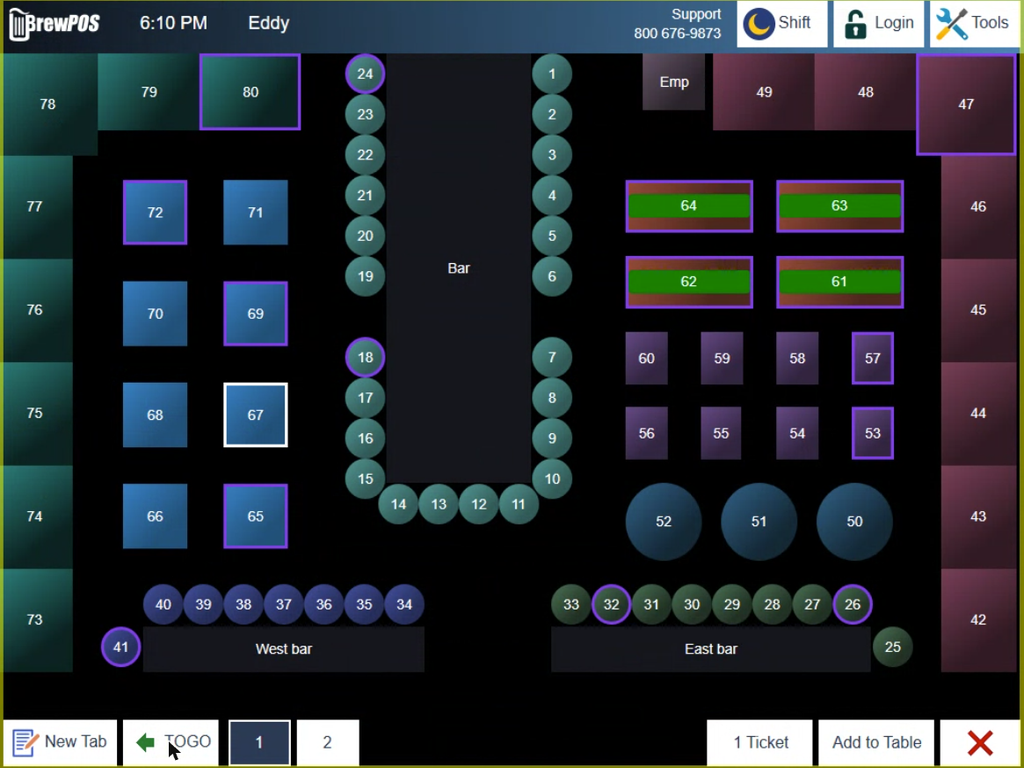
Figure 1. The tables screen. Table 67 is yours, the purple tables belong to other servers, and the green bars are pool tables on the clock
Tap a free table to start a ticket on it, or a table with a ticket to open that ticket.
Along the bottom of the tables screen you can also:
• start a New Tab or a TOGO order
• add another ticket to a table that already has one, with Add to Table
• see how many tickets you have open, on the button beside Add to Table
Start a tab
A tab is a ticket that is not tied to a table, for a guest at the bar or someone walking around.
1. Tap New Tab, at the bottom of the order screen or the tables screen. The customer screen opens (Figure 2).
2. Type the guest's name, or the last digits of their phone number. Customers already on file who match appear below the keyboard; tap one to put the tab in their name.
3. Otherwise tap New Tab, at the top. The tab starts with the name you typed, and the order screen opens on it.
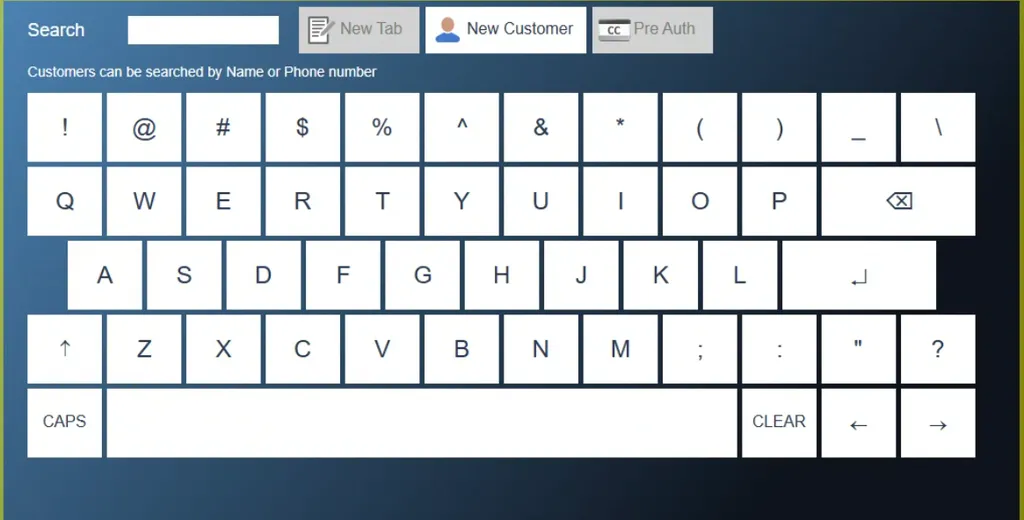
Figure 2. The customer screen that opens from New Tab
Along the bottom of that screen, All, Club, Emp and Trade narrow the customer list, and TOGO and HERE set whether the order is to go. New Customer adds the guest as a customer record. Pre Auth holds a card to open the tab, covered in Starting a tab with a card pre-auth.
Name a ticket
To put a name on any ticket, or change the one it has, tap the ticket number at the top of the ticket (Figure 3). The same screen opens with the current name in the box. Change it and tap the Enter key. The name shows beside the ticket number.

Figure 3. Ticket 808804, named Sam b
Move a ticket to another table
1. Open the ticket.
2. Tap the table number at the top right of the ticket (Figure 4). The tables screen opens.
3. Tap the table to move the ticket to. The ticket now shows the new table number.

Figure 4. The ticket header. Tap the table number to move the ticket
The tickets screen
Tap Toggle, the multicolored button at the bottom of the order screen, to swap the menu for the tickets screen (Figure 5). Tap it again to go back to the menu.
It has three tabs: My Tickets, All Tickets if you have permission to see everyone's, and QR Tix for orders placed with a QR code. The small number on each tab is how many tickets it holds. Each row shows the ticket number, the table, the server, when it was started and the total. Tap a row to open that ticket on the right.
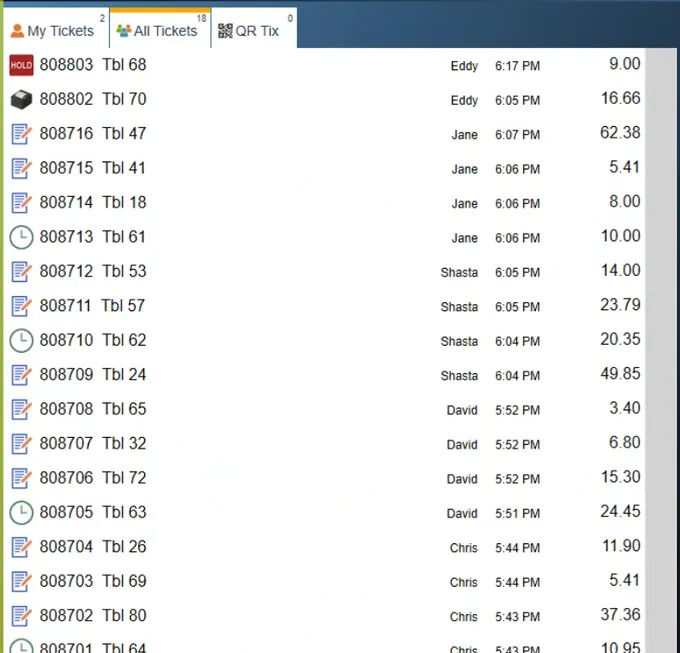
Figure 5. All Tickets. The symbol at the left of each row is the ticket's state
The symbol beside each ticket tells you what state it is in:
• Note pad: an ordinary open ticket
• HOLD: the ticket is being held back from the kitchen
• Printer: the presenter ticket has been printed and the ticket is waiting for payment. See Printing the presenter ticket
• $: partly paid
• Clock: a timed item, such as a pool table, is running
To look up a ticket that is already closed, use Tools, then History, which has its own Search.
About this guide
Applies to: the BREW POS terminal.
Last reviewed: 4 October 2026
BrewPOS How to use
Support 1-800-676-9874
Email [email protected]
© 2026 BREW POS. All rights reserved.