
Paying at the table with a QR code
Customers can pay their own check with their phone. They scan a QR code, see their check, add a tip and pay, and the ticket shows as paid on every station in the building.
Where the customer finds the code
There are two places, and you can use either or both.
On the presenter ticket. This is the bill you print for the table. The code prints at the bottom, above the words Pay Online (Figure 1). Open the ticket, tap the printer button beside Pay, and leave the presenter ticket at the table as usual. See Printing the presenter ticket. The code only prints while there is still something to pay.
On a handheld tablet. The check on your server's tablet has the code at the bottom (Figure 2). Hold the tablet out for the customer to scan.
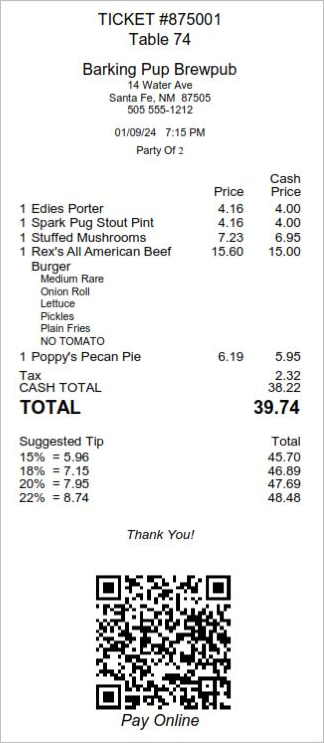
Figure 1. A presenter ticket. The Pay Online code is at the bottom
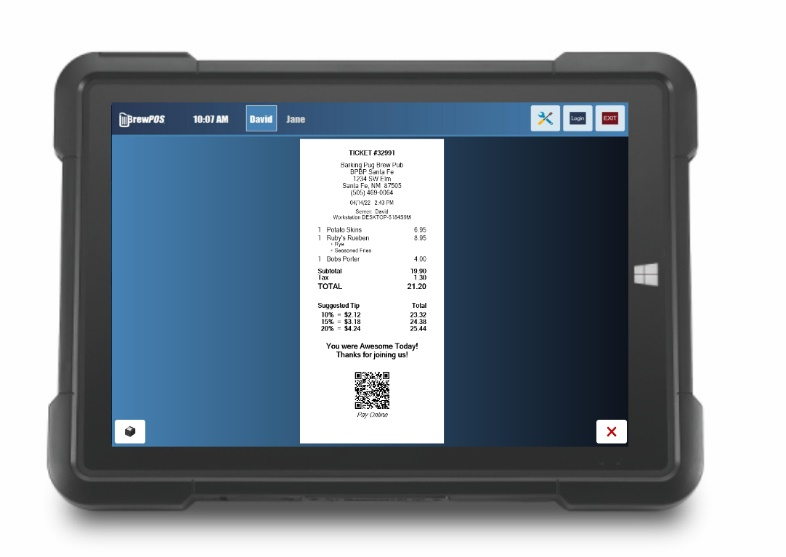
Figure 2. The check on a server's tablet, with the QR code at the bottom
How it works for the customer
The customer points their phone's camera at the code.
It opens a secure payment page showing their check (Figure 3).
They are asked to add a tip, then they pay.
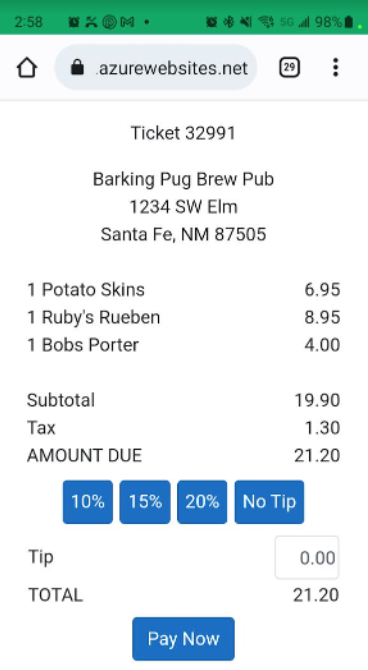
Figure 3. What the customer sees on their phone, with tip buttons
What you see
• The ticket shows as paid on the server's tablet and on every other station.
• The tip lands on your normal tip screens.
• The customer is saved as a customer record, so you can market to them later.
Getting it switched on
Pay at the table, the code on presenter tickets and handheld tablets are each switched on for your location by BrewPOS Support. Call 1-800-676-9874.
About this guide
Applies to: the BREW POS terminal.
Last reviewed: 4 October 2026
BrewPOS How to use
Support 1-800-676-9874
Email [email protected]
© 2026 BREW POS. All rights reserved.