
Taking tax off an order
Some sales should not carry tax. You can take the tax off a whole order from the ticket's more screen.
Take the tax off
1. On the order screen, tap more..., next to the order total at the bottom right.
2. Tap No Tax, bottom right of the more screen (Figure 1). The more screen closes and tax is switched off for the whole order.

Figure 1. No Tax, on the more screen. It is highlighted while tax is off
3. Check the total. The ticket shows NO TAX in its header and where the tax line was (Figure 2).
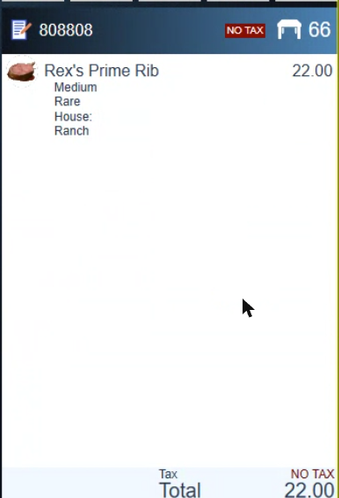
Figure 2. A ticket with the tax taken off
To put the tax back, tap more... and then No Tax again.
About this guide
BREW POS: front of house how-to guide
Applies to: the BREW POS terminal, build installed 23 September 2026. Checked on a running terminal on 30 September 2026.
Last reviewed: 30 September 2026 · Owner: Eddy
BrewPOS How to use
Support 1-800-676-9874
Email [email protected]
© 2026 BREW POS. All rights reserved.