
Reopening a shift report to enter tips
Sometimes a server runs their shift report and then realizes they forgot to enter a tip. You can put that right by reopening the shift report, which reopens their shift so the tip can go in. Then they run a new shift report.
Before you start
• You need manager permission. Without it, the shift report can be viewed but not reopened.
• The till must not have been dropped yet. Shifts that belong to a dropped till cannot be reopened this way.
Reopen the shift
1. Tap Shift, then All Shifts. Open shifts are on the left, in red. Completed shifts are on the right, in green (Figure 1).
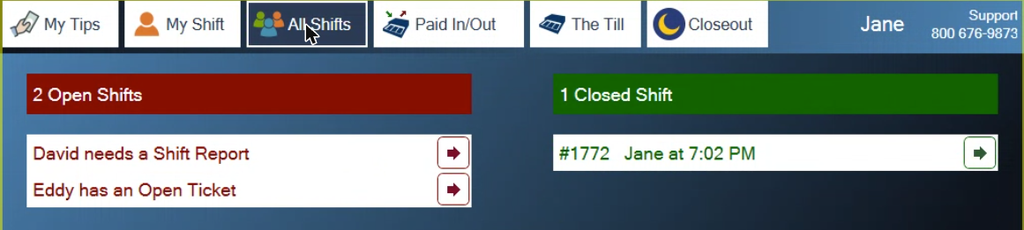
Figure 1. Jane's shift is complete. Tap the arrow on her line to open it
2. Tap the arrow at the end of the server's line. A box opens for that shift report (Figure 2), with View, Reprint and Re-open.
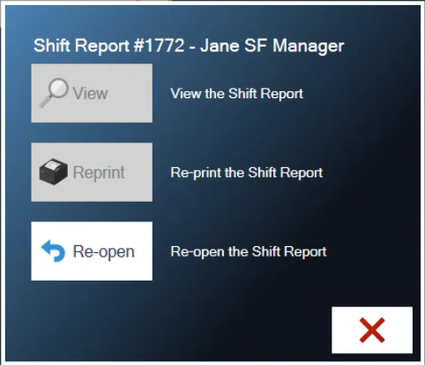
Figure 2. Re-open puts the shift back to open
3. Tap Re-open, then re-enter your PIN and tap the green check mark. The shift moves back to the open list and reads needs a Shift Report (Figure 3).
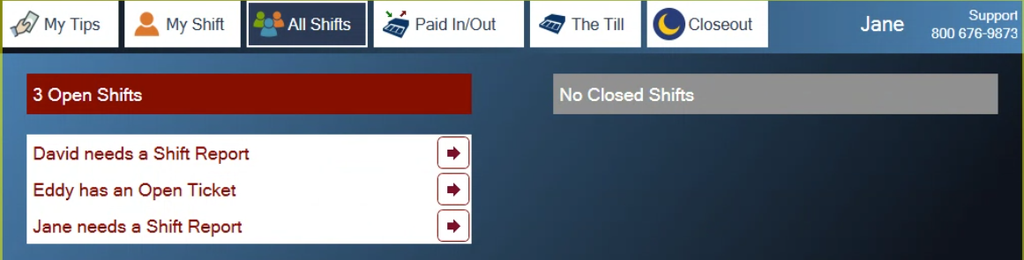
Figure 3. Jane's shift is open again
4. Have the server enter the missing tip. The steps are in Taking a payment and adjusting tips.
5. Have them run a new shift report to shift out again.
Watch out: the shift stays open until a new report is run
Reopening replaces the old shift report. The server must run a new one, or their shift stays open and the day cannot be closed out.
About this guide
BREW POS: front of house how-to guide
Applies to: the BREW POS terminal, build installed 23 September 2026. Checked on a running terminal on 30 September 2026 with a manager login.
Last reviewed: 30 September 2026 · Owner: Eddy
BrewPOS How to use
Support 1-800-676-9874
Email [email protected]
© 2026 BREW POS. All rights reserved.
Privacy Policy | Terms and Conditions